41
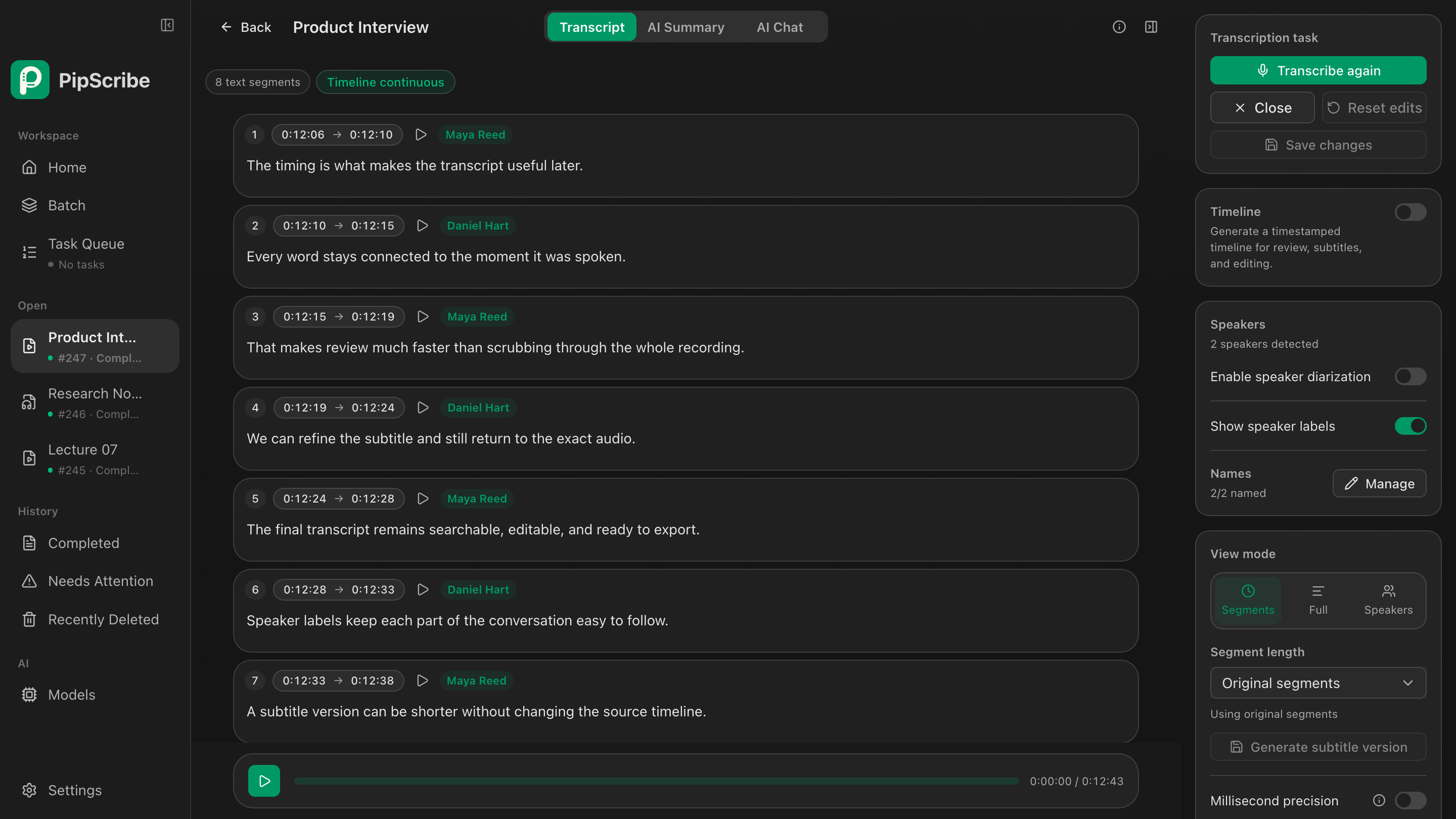
The timing is what makes the transcript useful later.
 PipScribe
Available for macOS and Windows
Bring every word back to the moment it was spoken.
A local AI transcription and subtitle workspace that turns long audio and video into searchable, editable, export-ready timed text.
The timing is what makes the transcript useful later.
Everywordstaysconnectedtothemomentitwasspoken.
That makes review much faster than scrubbing through the whole recording.
Turn speech into working material
From interviews to video footage, PipScribe keeps audio, text, and time connected so every later edit has a source.
Separate speakers and replay the original audio by segment.
Adjust timing, control subtitle length, and export.
Search long recordings and extract summaries and key ideas.
Record both sides of the conversation, then extract decisions and action items.
Windows meeting recording
Capture a selected app and your microphone as separate tracks. When the meeting ends, PipScribe transcribes locally and turns the conversation into an editable meeting workspace.
Confirmed outcomes stay easy to review.
Track owners, timing, and completion.
Return to the exact point in the recording.
Keep unresolved topics visible.
Bring almost anything
Import local audio or video, or paste a supported video URL. PipScribe prepares the media and adds the transcription to your local queue.
Supports common formats readable by FFmpeg
Transcribe locally after retrieving the media
Precise timing
Qwen3-ASR word-level timestamps keep playback, review, and subtitle editing on the same timeline.
Reviewtheexactwordwithoutlosingyourplace.
After transcription
Speaker labels, translations, and subtitle versions share one timeline. Continue the work in one place without moving content between tools.
First, verify the word-level timeline. Then refine the subtitle boundaries.
That way, every edit can be checked against the original audio.
Every edit stays connected to the original moment.
每一次修改,都与原始语音中的准确时刻相连。
The transcript becomes a subtitle without losing its timing.
Local models and our inference engine
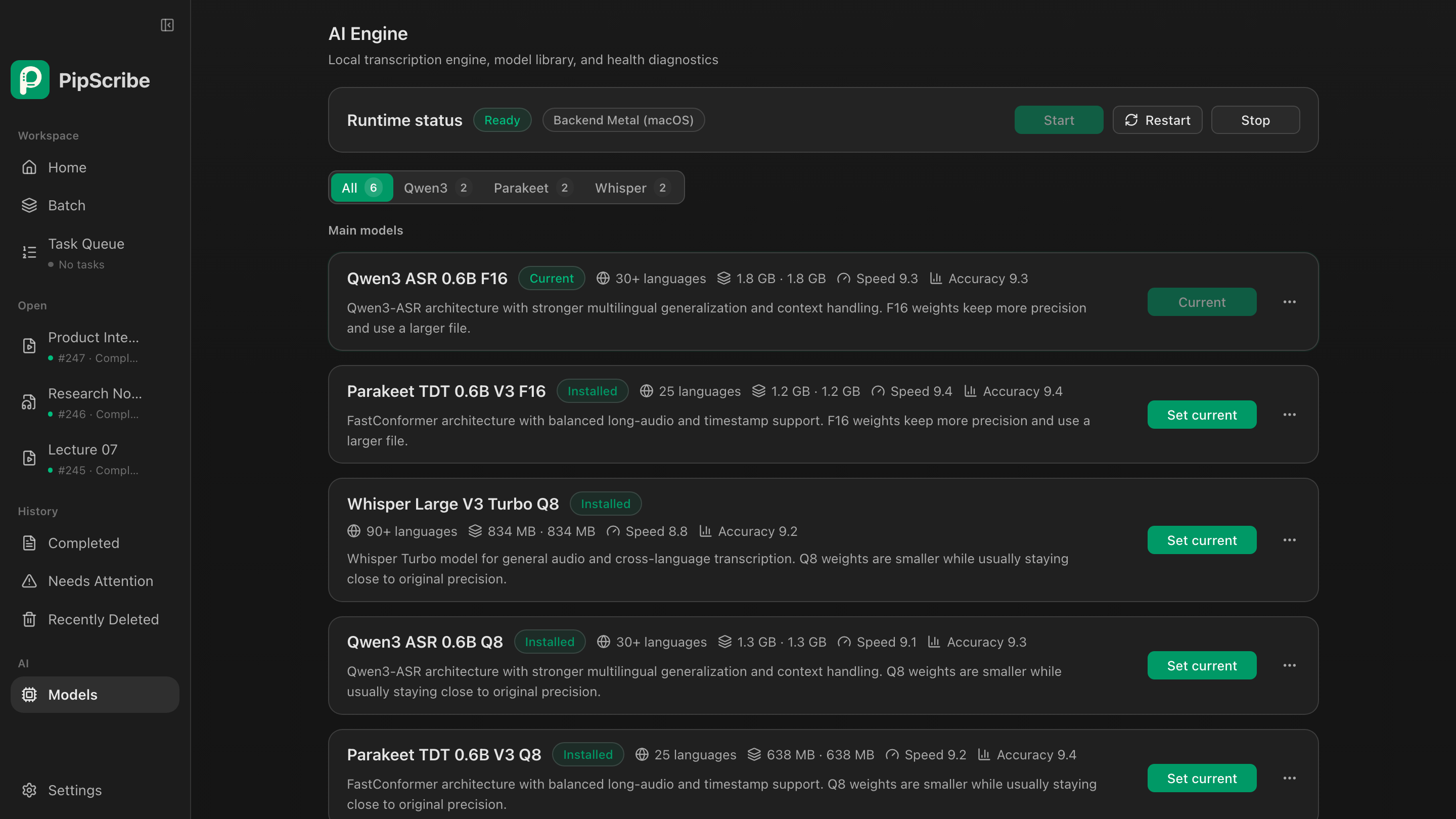
Match Parakeet, Qwen3, or Whisper to the task, then let PipScribe's own engine select the right local compute backend for your device.
Built for speed
Move through long recordings quickly. On an M3 MacBook, a 119-second test recording completed in as little as 3.3 seconds.Handles model loading, audio processing, and inference scheduling, with CPU fallback when no compatible GPU is available.
Accelerated on the Mac GPU.
A dedicated NVIDIA backend.
Accelerated on supported GPUs.
The macOS release uses Metal. The Windows release uses Vulkan on compatible GPUs, with CPU processing available as a fallback.
Understand, organize, and ask more
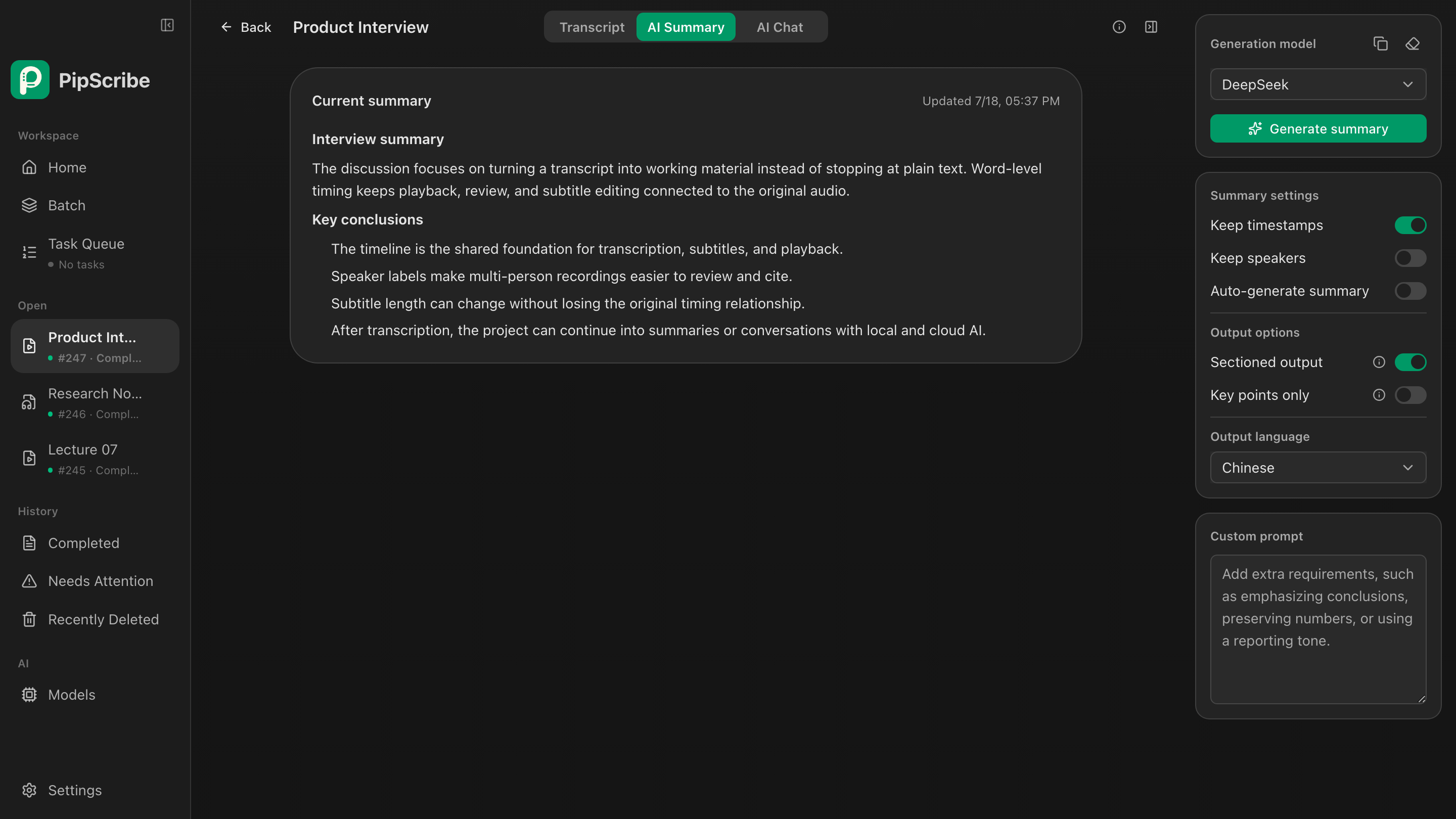
Summarize, extract key ideas, identify open questions, or chat with the current transcript. Edit the built-in prompts or create your own.
Turn this interview into an actionable summary.
Use word-level timing to locate the exact moment first, then review long pauses and subtitle boundaries. Summaries, corrections, and later edits all keep the same audio reference.
00:12:06 · Maya Reed: “First, verify the word-level timeline. Then refine the subtitle boundaries.”
A clear privacy boundary
Local by default. Online services connect only when you choose them.
Why PipScribe
Go beyond text with timeline review, subtitle preparation, and AI-assisted content work.
Swipe horizontally to compare
| Capability | PipScribe | Local transcription tools | Cloud transcription services |
|---|---|---|---|
| Original media processing | Local by default | Usually local | Upload required |
| Transcription model choice | Qwen3-ASR, Parakeet, and Whisper | Usually one or two model families | Chosen by the service |
| Word-level timeline | Playback, editing, and gap diagnostics | Basic playback and editing | Varies by service |
| Subtitle workflow | Timeline adjustments, subtitle versions, translation, and export | Partial support | Primarily generation and export |
| AI options | Local models or your own API | Varies by product | Built into the service |
| Batch processing | Files, folders, URLs, and a task queue | Usually file batches | Upload queue |
| Pricing model | One-time purchase | One-time purchase or subscription | Usually subscription or usage based |
Features vary by product, version, and plan. This table compares typical product positioning.
Download PipScribe
PipScribe is available for Apple Silicon Macs and 64-bit Windows PCs.
Transcribe audio and video locally on your Mac, then work with timelines, subtitles, and AI tools.
Transcribe files and record meetings locally on Windows, with optional Vulkan GPU acceleration.
Simple pricing
Try every feature on your own files before deciding to buy.
One-time license
Optional online translation and AI services use your own account or API key; provider charges may apply. Ollama and LM Studio run locally and require no cloud API.
14-day refund window · View refund policy
Before you start
PipScribe supports common formats readable by FFmpeg, including MP3, WAV, M4A, MP4, MOV, MKV, and WebM. Available codecs may vary by platform.
You can paste supported video URLs into the queue. Availability may change with the source website's rules; local file imports are unaffected.
After downloading a model, local file transcription does not require uploading your media to the cloud.
Yes. Use Ollama or LM Studio installed on your computer, or choose an online service when needed.
PipScribe supports 64-bit Windows 10 and Windows 11. Compatible GPUs can use Vulkan acceleration; CPU processing remains available.